

What if the very device meant to protect your family is actually compromising your privacy or cluttering your digital life? Many Singapore homeowners install a cctv camera expecting instant peace of mind, but they often end up frustrated by laggy feeds caused by thick HDB concrete walls or the “app fatigue” of managing multiple standalone devices. You deserve a security setup that works for you, not one that requires a degree in IT to maintain.
Choosing a cctv camera for your HDB or condo requires more than just looking at the price tag. You need hardware that actually catches a face at the end of a long corridor. While 1080p used to be the gold standard, 4K is now the benchmark for high-detail facial recognition in Singaporean homes. Higher resolution allows you to zoom into recorded footage without the image turning into a pixelated mess. Beyond the camera itself, sourcing high-quality components from reputable vendors like Asthome Smart Electrical Supplies ensures your entire system is built on a reliable foundation. Modern systems use H.265 compression, which reduces file sizes by nearly 50% compared to older codecs, letting you store weeks of footage without constantly clearing space.
At Home-A-Genius, we believe technology should be fun and effortless. That’s why we’ve compiled the ultimate selection checklist to help you secure your space with high-definition clarity and reliable local storage. We’ll show you how to bypass common pitfalls like cloud-based privacy leaks and signal interference in modern condos. This guide is built by Singaporeans for Singaporeans, ensuring your setup survives our unique local architecture. You’ll learn how to achieve a “1 App” lifestyle where your security integrates perfectly with your existing smart scenes. Say Hello to Smart! and get ready to experience a seamless home where everything responds to a single tap.
Key Takeaways
- Upgrade your home security by identifying why 4K resolution and full-color night vision are the new standards for crystal-clear facial recognition in Singaporean corridors.
- Protect your family’s privacy with cyber-secure local network storage, avoiding the recurring subscription fees and data risks associated with cloud-based systems.
- Stay compliant with HDB Town Council regulations and PDPA laws to ensure your cctv camera setup is both effective and legally sound.
- Say hello to a seamless “1 App” experience by learning how to integrate your surveillance with smart lights and locks for automated peace of mind.
- Find the perfect balance between lifestyle monitoring and high-level protection by comparing standalone Wi-Fi cameras with professional-grade IP systems.
Choosing the Right CCTV Camera for Singapore Living
Ever wondered what happens at home while you’re stuck in a meeting at Raffles Place? Modern security has evolved. While the basic concept of What is CCTV? remains the same, the application for Singaporeans has shifted from mere surveillance to essential lifestyle connection. A cctv camera today serves as your eyes and ears for monitoring the kids, checking on elderly parents, or ensuring your pets aren’t redecorating the sofa while you’re out. It’s about staying connected to what matters most through a single, seamless interface.
You might be tempted by those S$30 standalone cameras found on online marketplaces. However, high-density HDB estates often suffer from heavy signal interference because dozens of competing Wi-Fi networks crowd the airwaves. These “cheap” cameras frequently drop connections or lag during critical moments. Professional-grade IP camera systems provide a stable, high-bandwidth backbone that ensures your feed is always live and crisp. At Home-A-Genius, we believe security should respect your privacy. Our systems are built by Singaporeans for Singaporeans, focusing on cyber-secure encryption so your private moments stay private. Why settle for a glitchy connection when you can have total peace of mind?
Indoor vs. Outdoor: Identifying Your Coverage Needs
Indoor monitoring requires specific features like two-way audio to speak with family members and wide-angle lenses to cover compact apartment layouts. If you live in a landed property or a ground-floor unit, look for IP67 weatherproofing to withstand our intense tropical downpours and humidity. For those in high-traffic corridors, consider IK10-rated vandal-proof housing. This protects your cctv camera from accidental knocks during furniture moves or intentional tampering by passersby. Making the right choice ensures your equipment survives the unique challenges of the local environment.
Form Factor: Dome, Bullet, or Discreet?
The Essential Technical Checklist: Resolution, Storage, and Connectivity
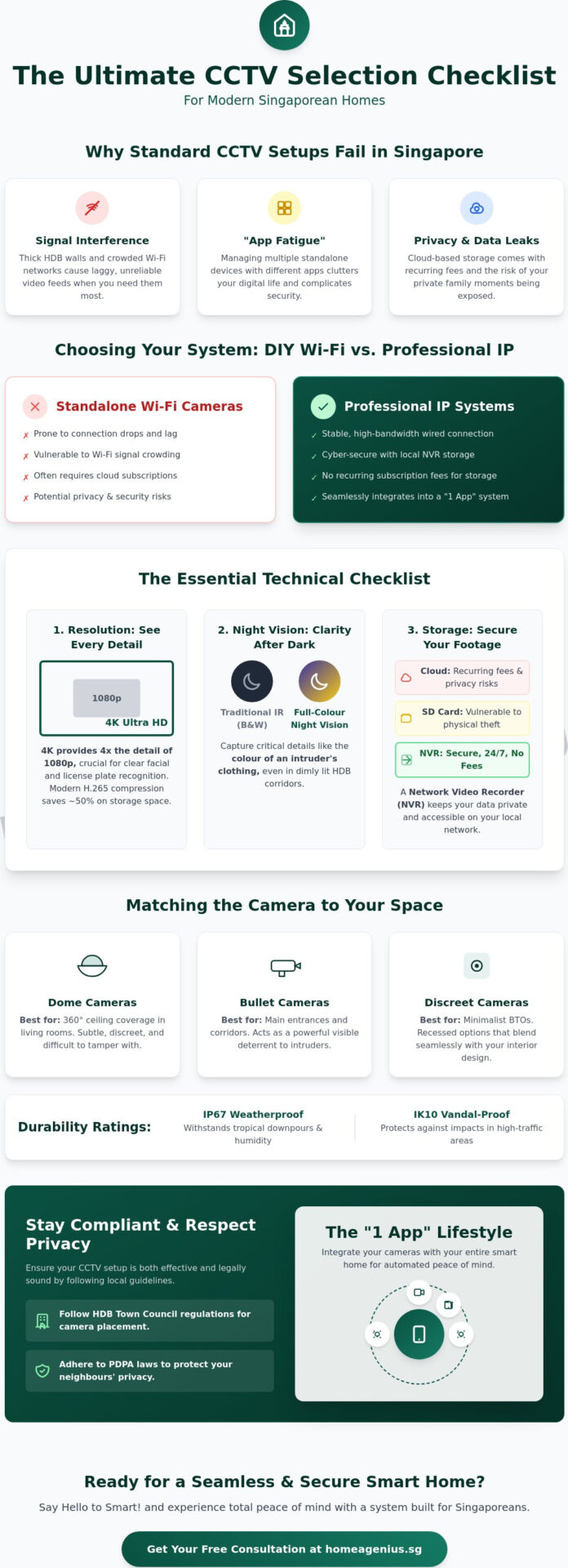
Choosing a cctv camera for your HDB or condo requires more than just looking at the price tag. You need hardware that actually catches a face at the end of a long corridor. While 1080p used to be the gold standard, 4K is now the benchmark for high-detail facial recognition in Singaporean homes. Higher resolution allows you to zoom into recorded footage without the image turning into a pixelated mess. Modern systems use H.265 compression, which reduces file sizes by nearly 50% compared to older codecs, letting you store weeks of footage without constantly clearing space.
Night vision is another critical factor for home security. Traditional Infrared (IR) gives you black-and-white images, but full-color night vision uses high-sensitivity sensors to show you the exact color of an intruder’s clothing even in dim corridor lighting. For storage, you have three main paths:
- SD Cards: Good for quick, single-camera setups but vulnerable if the camera is stolen.
- NVR (Network Video Recorder): The professional choice for 24/7 high-capacity recording across multiple cameras.
- Cloud Storage: Offers off-site security and easy access, though it often requires a monthly subscription.
If you choose to record footage, ensure you follow the PDPA guidelines for CCTV to respect neighbor privacy and data security. This keeps your home safe while staying on the right side of local regulations.
Breaking Down Video Resolution and Clarity
A 4K resolution provides four times the detail of 1080p, making it much easier to identify license plates or small delivery labels. You also need to consider the Field of View (FOV). A 120-degree wide-angle lens covers an entire living room, but it can create a “fisheye” effect that distorts faces at the edges. Balancing high resolution with a proper FOV ensures every corner stays sharp.
Overcoming the “Concrete Wall” Connectivity Issue
Singaporean homes are built like bunkers. Thick reinforced concrete walls in HDBs and condos kill Wi-Fi signals, causing your cctv camera to lag or drop its feed. For renovations, Power over Ethernet (PoE) is the king of reliability because it provides power and data through one cable. If you aren’t rewiring, a Wi-Fi 6 Mesh or a professional network infrastructure setup is essential for stable 4K feeds. You can always chat with our experts to find the best wiring route for your floor plan.
Privacy and Data Security: The Local Network Advantage
Have you ever wondered where your video feed goes after it leaves the lens? Many popular brands beam your data to offshore third-party cloud servers. This creates a massive vulnerability; if that provider suffers a breach, your private home life becomes public property. At Home-A-Genius, we believe your home security should stay inside your home. Local network processing is the gold standard because it keeps your data off the public internet, where it’s most at risk.
Local vs. Cloud Storage: A Security Comparison
Third-party cloud servers are centralized targets for global cyber-attacks, making them inherently less secure than a private local network. Beyond privacy, the math simply favors local storage. A typical cloud subscription costs between S$7 and S$20 per month for each cctv camera. Over a three-year period, you could spend upwards of S$720 just for the right to view your own footage. Choosing a one-time NVR (Network Video Recorder) investment eliminates these recurring fees entirely while keeping your data under your control.
- Cost Efficiency: An NVR usually pays for itself within 18 months compared to subscription models.
- Redundancy: You can back up local footage to a secondary Network Attached Storage (NAS) unit located in a different room to prevent data loss.
- Zero Latency: Local processing means your feed doesn’t lag when your internet connection fluctuates.
Cyber-Secure Integration for Peace of Mind
We built our system by Singaporeans for Singaporeans, focusing on a “local-first” architecture. This means your cctv camera processes data on the Home-A-Genius Smart Hub rather than a distant server. We use AES-256 encryption standards, which is the same level of security required for banking transactions in Singapore. This ensures that even if someone intercepted the data packet, they couldn’t read it. It stays scrambled and useless to intruders.
To keep your feed secure while you are overseas, our hub creates an encrypted tunnel for remote access. You don’t have to leave your ports open to the world. Always enable Multi-factor authentication (MFA) on your security app to add a second layer of verification. Say Hello to Smart! Our “1 App” solution consolidates your security into one protected ecosystem. You get total control without the anxiety of data leaks. Join #TeamHomeAGenius and experience how we keep your four walls truly private through superior local networking.
Installation and Legal Considerations for HDB and Condos
Setting up a cctv camera in Singapore isn’t just a “plug and play” affair. You’ve got to play by the rules to keep your security legal and your neighbors happy. The Personal Data Protection Act (PDPA) 2012 governs how data is collected, and while it generally excludes personal use within the home, things get tricky once your lens points toward common property. If you’re in an HDB flat, Town Council rules are crystal clear. You can’t install cameras facing the common corridor without prior written approval. Usually, the Town Council only grants these permits for specific safety concerns, such as harassment or repeated debt collection issues, and they often require a police report to even consider your application.
Condo living adds another layer of complexity. Your Management Corporation Strata Title (MCST) has the final authority over the building’s facade and common areas. Most MCST bylaws prohibit any alterations to common property, which includes the external walls of your unit. Before you drill a single hole, you must submit a formal request to your management office. They’ll check if your camera’s field of view invades your neighbor’s privacy or if the wiring looks messy. Ignoring these steps can lead to hefty fines or a legal order to remove the equipment immediately.
Navigating Singapore CCTV Regulations
One of the most overlooked rules is the “No Audio Recording” guideline. In residential shared spaces, capturing audio is often seen as a significant breach of the Community Disputes Resolution Act. It’s far more intrusive than video. For landed property owners, while you have more freedom, you’re still encouraged to place privacy stickers or signage if your cameras capture public sidewalks. This transparency prevents neighbor disputes from escalating to the State Courts. If a neighbor complains, the first step is always mediation, but having your cctv camera positioned correctly from day one saves you from these headaches.
Professional Installation: Aesthetics and Reliability
DIY “stick-on” cameras might seem easy, but they often leave you with blind spots and “spaghetti wiring.” Professional installers specialize in the art of hidden cabling. If you’re currently in the BTO renovation phase, it’s the perfect time to integrate your security system. We hide wires inside false ceilings or behind custom carpentry, ensuring your home looks like a sanctuary, not a server room. Beyond looks, a professional setup ensures your cameras are angled to maximize coverage without violating privacy laws. For a truly integrated experience, consider how professional smart home design can place your hardware strategically to cover every corner of your floor plan seamlessly.
Don’t risk legal trouble or ugly wires in your dream home. Talk to our security experts at Home-A-Genius for a compliant installation today.
Integrating CCTV into Your Unified Smart Home Ecosystem
Managing a home shouldn’t feel like a part-time job. Many Singaporean homeowners find themselves juggling separate apps for their lights, locks, and security systems. This fragmented approach is inefficient and leaves gaps in your safety net. Home-A-Genius eliminates this friction by consolidating everything into a “1 App” experience. When your cctv camera is part of a unified ecosystem, it stops being an isolated observer and starts acting as the brain of your home security.
The true power of integration lies in automated triggers. Imagine it’s 2 AM and your outdoor camera detects movement near your front gate. In a traditional setup, you’d just get a notification that you might sleep through. In a Home-A-Genius smart home, that detection can automatically trigger the living room lights to turn on and flash the bedroom lamp. This proactive response deters intruders before they even reach your door, turning a passive recording into an active defense system.
Creating Smart Security Scenes
Smart scenes allow you to change your home’s behavior with a single tap. When you activate “Away” mode, the system doesn’t just arm the sensors. It activates the cctv camera, ensures all windows are shut, and begins simulating occupancy by toggling smart lights at random intervals to make the house look lived-in. Conversely, “Welcome Home” mode can automatically tilt indoor cameras toward the wall to guarantee your family’s privacy the moment you step through the door. Integrating your cameras with smart digital locks also allows for verified entry, so you can see exactly who is entering your home in real-time.
Future-Proofing Your Home Security
Modern security is moving beyond simple motion sensing. AI-powered detection now distinguishes between a human, a neighborhood cat, or a falling leaf with over 95% accuracy in high-end models. This means fewer false alarms on your phone and more meaningful alerts. As your family grows, a unified system is easy to expand. You can add more sensors, hubs, or cameras without needing to learn a new interface. This scalability ensures your investment stays relevant as technology evolves. Say hello to smart security and book a demo at our Experience Centre to see how we make home protection effortless.
Say Hello to a Smarter, Safer Singapore Home
Your home should be your sanctuary. Selecting the right cctv camera involves more than just picking a high resolution; it’s about navigating HDB regulations and ensuring your data stays off public clouds. Homeowners must comply with the Personal Data Protection Act (PDPA) while maintaining a seamless smart home ecosystem. By prioritizing local network architecture, you eliminate the latency and security risks often found in generic, overseas cloud-based systems.
#TeamHomeAGenius understands the nuances of Singapore living. We provide a locally developed Smart Hub built by Singaporeans for Singaporeans, ensuring your footage remains cyber-secure within your own walls. Our team handles the heavy lifting with expert installation that guarantees zero messy trunking, keeping your interior aesthetics in tip top condition. It’s time to stop worrying about blind spots and start experiencing the fun of a truly integrated home.
Secure your home with Home-A-Genius: Get a custom CCTV consultation today
Imagine a future where your safety is automated and your privacy is absolute. We’re ready to help you build it.
Frequently Asked Questions
Do I need a permit to install a CCTV camera outside my HDB flat?
You generally don’t need a permit to install a cctv camera inside your HDB, but external corridor installations require Town Council approval. According to HDB guidelines updated in May 2021, cameras shouldn’t face your neighbor’s door or windows to respect privacy. If you’re facing a security issue like harassment, you’ll need a police report before the Town Council grants a 6 month permit. It’s about keeping your home safe while remaining a good neighbor.
Can I install a CCTV camera in my condo balcony or corridor?
You must seek approval from your Management Corporation Strata Title (MCST) before installing cameras in condo common areas or balconies. Every condo has specific by-laws under the Building Maintenance and Strata Management Act. Typically, corridors are off-limits because they’re common property. For balconies, management often restricts installations that alter the building’s facade. Always check your estate’s specific handbook to avoid a removal notice and potential fines.
What is the difference between an IP camera and a traditional CCTV?
IP cameras transmit digital signals over a network cable, while traditional CCTV uses analog signals through coaxial cables. IP systems offer higher resolutions, often reaching 4K or 8MP, compared to the lower clarity of older analog systems. You’ll find IP setups easier to integrate into your smart home because they sync directly with your Wi-Fi. This lets you manage everything through 1 App for a seamless experience. Say hello to smart, high-definition monitoring.
How long can a 1TB NVR store footage from 4 CCTV cameras?
A 1TB NVR typically stores about 6 to 10 days of continuous footage from 4 cctv camera units recording at 1080p resolution. If you increase the resolution to 4K, this storage time drops to roughly 2 or 3 days. To save space, set your system to record only when it detects motion. This smart optimization ensures you keep the most important moments without needing massive hard drives. It keeps your storage efficient and your footage easy to find.
Will a wireless CCTV camera work through my bomb shelter walls?
Wireless signals won’t penetrate the 250mm to 300mm thick reinforced concrete walls of a Singapore bomb shelter. These shelters act like a Faraday cage, effectively killing your Wi-Fi connection. If you need a camera inside or near the shelter, we recommend a hardwired LAN cable installation. This ensures your security remains Cyber-Secure and stable, preventing any frustrating signal drops when you need monitoring most. Don’t let thick walls compromise your safety.
Is it legal to record audio on my home CCTV in Singapore?
It’s legal to record audio inside your own home, but recording conversations in public areas or your neighbor’s unit violates the Personal Data Protection Act (PDPA). Singapore’s privacy laws are strict about capturing audio without consent in shared spaces. Stick to visual recording for your corridor-facing cameras. Inside your four walls, audio recording is a great tool to monitor your pets or ensure your kids are safe with their sitters.
How do I access my CCTV footage if my home internet is down?
You can still view your footage by connecting a monitor directly to your NVR or DVR via HDMI or VGA. While your remote mobile app won’t work without an internet connection, the local recording system stays active 24/7. Your cameras continue writing data to the hard drive even if the cloud sync is interrupted. Once your fiber connection is back up, your 1 App will automatically reconnect for remote viewing. Your home stays protected regardless of your connection.
What is the best CCTV brand for home use in Singapore?
The best brand depends on your needs, but Hikvision and Dahua are global leaders widely used in Singapore for their reliability. For homeowners wanting a “Singaporean for Singaporeans” experience, Home-A-Genius provides integrated systems that combine these high-quality cameras into a single, easy-to-use ecosystem. We focus on local lifestyle needs, ensuring your setup is both high-tech and incredibly simple to manage. Experience the peace of mind that comes with a system built for your home.
