Cloud vs Local Smart Home: The Question They Left Out (Singapore)

“The Cloud Is Safe.” Sure. But That Was Never the Real Question.
There’s an argument doing the rounds in Singapore’s smart home scene: that a cloud-based system running on something like AWS is more secure than a local hub sitting in your home. The reasoning sounds airtight — AWS is trusted by banks and governments, it encrypts everything, it’s monitored 24/7, it holds every certification under the sun.
All true. And all beside the point.
Because the question was never “is Amazon’s cloud secure?” Of course it is. The real question is: does your family’s data need to be on it at all?
Here’s the part that quietly gets skipped.
Privacy vs Security — and the Own-Goal Hidden Inside It
The cloud argument opens by separating two ideas: privacy (who can see your data) and security (how well it’s protected). Fair enough — they are different.
But watch what happens when you follow it through. Everyone agrees local storage is more private — your data stays inside your home. The cloud camp’s only rebuttal is that a local hub might be less secure if it’s set up badly by an amateur.
That’s not an argument against local-first. That’s an argument against DIY. A cheap box flashed together by a hobbyist with an open port is a real risk. A professionally installed, encrypted, properly configured local system is a completely different animal — and that’s what a real smart home company delivers. Comparing enterprise cloud to a badly-secured DIY hub isn’t a fair fight; it’s a strawman.
“AWS Is Secure” ≠ “Your Data on AWS Is Secure”
This is the biggest gap in the whole argument, and it has a name: the shared responsibility model.
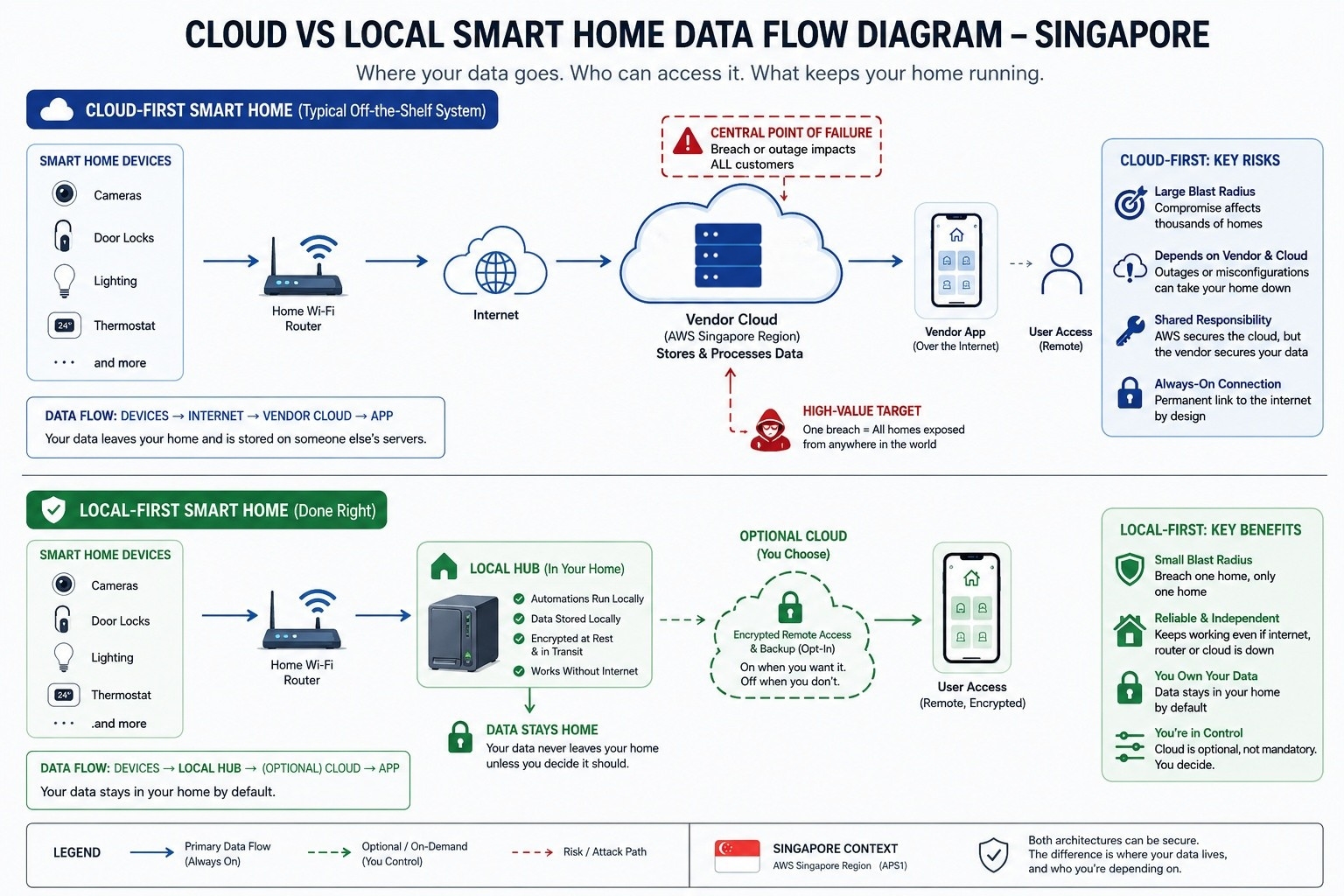
AWS secures the cloud — the buildings, the hardware, the network. But the vendor is responsible for security in the cloud — their app, their access controls, their configuration, how they store your camera feeds and routines. AWS hands you a vault. Whether the vendor actually locks it is entirely on them.
And this is where things break in the real world. Industry analysts consistently find that the overwhelming majority of cloud breaches don’t come from the cloud provider failing — they come from how the tenant set things up. A leaky storage bucket. An over-privileged API key. A misconfigured permission.
So when a vendor waves around ISO 27001 and SOC 2, ask a simple question: whose certifications are those? Almost always, they’re AWS’s — a description of the data centre, not proof of how your specific vendor handles your specific data.
The Blast Radius Problem
Now the part that should genuinely give you pause.
Break into one local hub, and an attacker gets one home. They’d have to physically show up, or already be inside your network, to do it.
Break into the vendor’s cloud account, and they get every home at once — potentially thousands of Singapore families’ cameras, door locks, and daily routines, from anywhere on earth. Centralising an entire customer base behind a single login isn’t just convenient. It’s the single most valuable target you could possibly build.
This isn’t hypothetical. The cloud platforms powering many off-the-shelf smart systems have suffered region-wide outages that knocked devices dark en masse — no hack required, just a bad day at the data centre. When your home depends on a server you don’t own, in a building you’ll never see, its worst day becomes your worst day too.
“But It Still Works Locally!” — Then Why Is Your Data Up There?
The cloud camp’s fallback is that their systems run key automations locally and only use the cloud for remote access, updates, and backup.
Notice what that quietly admits: local control is the part that matters. They’re conceding our entire point. But it raises the obvious follow-up — if your automations already run locally, why does the brain of your home, and your private data, still live on someone else’s server by default?
With a local-first system, that’s flipped. The intelligence and your data stay home. The cloud is opt-in — you can switch on encrypted remote access or backup if you want it, but nothing leaves your house unless you decide it should. Same “best of both worlds” they’re selling — except the default is your home, not their server.
The “Hidden Backdoor” Question — Answered, Then Returned
The sharpest jab in the cloud argument goes like this: if a vendor claims to be “offline” but still pushes security updates, where do those updates come from? Is there a secret backdoor?
Easy. Local-first has never meant air-gapped. It means the cloud is optional, not mandatory. Updates are pulled by you, on your terms, over an encrypted channel that is closed the rest of the time. That’s not a hidden backdoor — it’s a front door you control, that stays shut when you’re not using it.
Which sets up the question worth returning: a cloud-first home holds a permanent, always-open line to the internet, 24/7, by design. So — with an always-on cloud home, how would you ever actually know what’s being sent, and when? A door that’s always open doesn’t need a backdoor.
What Local-First Actually Looks Like (Done Right)
To be clear, this isn’t cloud-phobia. It’s about defaults and ownership. A properly delivered local-first home gives you:
- Automations that keep running when the internet, the router, or a distant server has a bad day.
- Data that stays in your home by default — the most secure data is the data that never had to leave.
- Encryption and professional configuration out of the box, not left to you to figure out.
Optional, encrypted cloud for remote access or backup — on when you want it, off when you don’t.
The Real Takeaway
“Cloud equals less secure” was always too simple. But so is “the cloud is safe, so put your home on it.” The honest version is this:
The safest data is the data that never needed to be uploaded. The most reliable home is the one that doesn’t depend on a server you don’t own.
You shouldn’t have to choose between a smart home and a private one. With the right architecture, you get both — kept where it belongs.
Want to see a local-first smart home that keeps working when the Wi-Fi doesn’t? Message us on WhatsApp with the keyword OFFCLOUD, or book a showroom visit — we’ll show you exactly what runs with the internet pulled out of the wall.